

Workspaces
Workspaces are isolated copies of a site that live on their own git branch and are served on their own domain. They allow you – or several coding agents – to work on multiple features of the same application at the same time, without switching branches or stepping on each other’s changes. Every workspace is a subdomain of its parent site. If you create a workspace for the branchfeature-auth of shop.test, Herd serves it at feature-auth.shop.test. Because the workspace shares the parent’s domain, cookies that are scoped to .shop.test keep working.
Workspaces require a git repository with at least one commit, and the Herd app must be running.
Creating a workspace
Via the CLI
Runherd workspace in the directory of a site to create a new workspace. You can pass a name that Herd uses for the branch and the domain. Without a name, Herd generates a random one.
.env file and your dependencies. Windows doesn’t support copy-on-write clones, so every workspace is a full copy of your project that uses additional disk space, and creating a workspace for a large project can take a moment. If dependencies are missing or stale, run composer install and npm install inside the workspace.
The workspace uses the same PHP version as its parent site and is secured if the parent site is secured.
Via the Applications window and Herd Studio
If a site is a git repository, you can start a coding agent in a new workspace. Select the site in the Applications window, enter your prompt in the “Build with AI” field and check “Run in a new workspace”. You can select whether the workspace uses a shared database, a copy or an empty database – see Databases. Herd creates the workspace, starts the agent in it and opens Herd Studio for the workspace. You can also create workspaces directly from Herd Studio. Workspaces that you create from another workspace always branch off the parent site. The “Workspaces” section in the inspector of the Applications window lists all workspaces of a site and allows you to open or delete them.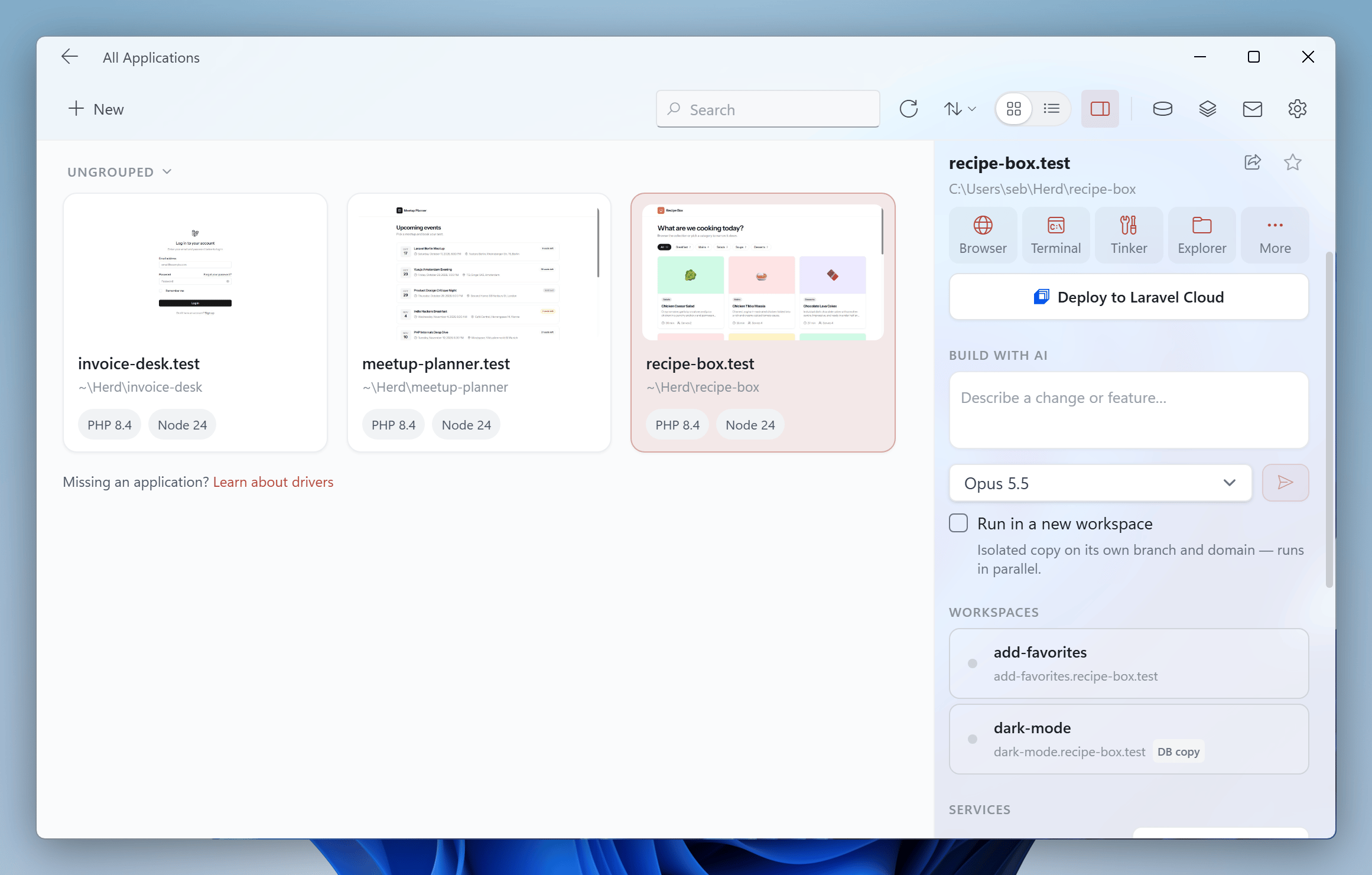
Databases
By default, workspaces share the database with their parent site. This is fast, but migrations in one workspace affect all others. You can give a workspace its own database instead:
Herd supports isolated databases for MySQL, MariaDB, PostgreSQL and SQLite, based on the
DB_CONNECTION of your .env file. Herd creates the new database on the same server as the parent’s database and names it after the parent database and the branch, for example shop_feature_auth. If Herd can’t create the database, it falls back to the shared database and tells you why.
For MySQL and MariaDB, Herd uses mysqldump to copy the data including routines, triggers and events. For PostgreSQL, Herd creates the database from a template of the parent database. For SQLite, Herd copies the database file.
You can set a default mode for your project in the herd.yml file.
Environment variables
Herd copies the.env file of the parent site and updates the values that depend on the domain:
APP_URLpoints to the URL of the workspace.SESSION_DOMAINpoints to the workspace domain if it was set to the parent domain. Values with a leading dot like.shop.testalready cover the workspace and stay unchanged.SANCTUM_STATEFUL_DOMAINSreplaces the parent domain with the workspace domain.DB_DATABASEpoints to the new database if the workspace has its own database.
.env file. You can set additional values with the env option in the herd.yml file.
Managing workspaces via the CLI
herd workspaces
List the workspaces of the site in the current directory with their parent site, URL, PHP version, database and type. Use--site= to list the workspaces of a specific site or --all to list the workspaces of all sites.
herd workspace:switch
Change the directory of your current Command Prompt session to a workspace.herd command. There, Herd prints the path of the workspace so that you can cd into it.
herd workspace:open
Open a workspace in your browser.herd workspace:merge
Merge the branch of a workspace into the branch that it was created from. The workspace must not have uncommitted changes. If the branches can’t be merged cleanly, Herd aborts the merge.herd workspace:delete
Delete a workspace. Herd unlinks the site, removes its certificate, drops its isolated database and deletes its files. The branch stays in your repository, so you don’t lose any commits.
All commands accept the workspace name or its domain. If you run them inside a workspace directory, you can omit the name.
Using existing git worktrees
If you already usegit worktree add to work on several branches, Herd can serve these worktrees as workspaces as well.
Run herd workspace inside a git worktree to register it. Herd serves it under its branch name, copies the parent’s .env file and copies vendor and node_modules of the parent if the lock files are identical. Otherwise, Herd reminds you to run composer install or npm install.
feature-auth.shop.test. Herd shows a setup page and serves the worktree with the shared database of the parent site. Herd adds the domains of your worktrees to the hosts file while it is running, so that they resolve in your browser. The Workspaces section of the Applications window also lists worktrees that Herd doesn’t serve yet.
When you delete a workspace that is a git worktree, Herd runs git worktree remove. Use --keep-files to keep the directory.
Configuring workspaces in herd.yml
You can configure how Herd sets up workspaces for a project in theworkspaces section of your herd.yml file:
All paths must be relative to the project.
env values can use the following placeholders: {{domain}}, {{scheme}}, {{branch}}, {{parent}}, {{parent_domain}} and {{database}}.
Hooks run line by line in the workspace directory with the workspace’s PHP version. If a command fails, Herd stops the hook and shows a warning, but keeps the workspace. Hooks have access to these environment variables: HERD_WORKSPACE_HOST, HERD_WORKSPACE_URL, HERD_WORKSPACE_PATH, HERD_WORKSPACE_APP_PATH, HERD_WORKSPACE_BRANCH, HERD_WORKSPACE_KIND, HERD_WORKSPACE_PARENT_PATH, HERD_WORKSPACE_PARENT_SITE, HERD_WORKSPACE_DATABASE and HERD_WORKSPACE_DATABASE_MODE.
If you want to use settings that you don’t want to commit, put them in a herd.local.yml file. Herd reads the herd.yml of the workspace first, then applies the herd.local.yml of the parent site and finally the herd.local.yml of the workspace itself. Lists like copy are combined, env values are merged, and all other values are overwritten.