
Herd 2.0 is here, and it turns Herd from the fastest way to install PHP into the place where Laravel apps get built, from the first idea to a live deployment.
For years, Herd had one job: give you a native, zero-config PHP and Laravel environment so you never have to think about nginx, DNS or PHP versions again. More than 90,000 developers rely on it every day for exactly that, and that job is not going anywhere.
But the way software gets built has changed. Coding agents write a growing share of the code, and a whole new group of people is starting to build their own apps without ever having written a line of PHP. Herd 2.0 is built for both: the developers who want AI to fit into the workflow they already have, and the newcomers who want to turn an idea into a real, stable application.
Keep your workflow. Try the new parts when you're ready.
If Herd is already part of your daily setup, nothing changes unless you want it to. PHP, nginx, DNS, Node, Composer and the Laravel installer are still ready in one native app. Per-site PHP and Node versions, HTTPS with one click, a shared herd.yml for your team, and with Herd Pro, MySQL, PostgreSQL, Redis, mail testing, Insights, Tinker and Xdebug detection all work exactly as before.
The new AI features are there when you want them and invisible when you don't. So our suggestion: leave them on, keep working the way you do today, and give Herd Studio a try on your next feature or bug fix. You might be surprised how much faster it is to point at a broken element than to describe it.
And if you would rather not have them at all, every AI feature in Herd 2.0 can be switched off completely. Herd then stays the environment you know.
AI made building possible. Structure makes it last.
So why build AI into Herd at all? Because it is changing who gets to build software. With today's coding tools, almost anyone can describe what they want and have an agent write the code. That is a huge shift, and we think it is a good one.
The problem is what often comes out of it. Without structure, agents invent their own architecture for every feature, mix patterns, skip validation, hand-roll authentication and leave you with a codebase nobody, including the agent, can safely change a month later. It works in the demo and falls apart in production. You know the word for it: slop.
Laravel has spent more than a decade solving exactly this problem for humans. It gives every app the same conventions, the same folder structure, battle-tested authentication, validation, queues, mail and a security model that just works. Those conventions turn out to be just as valuable for agents. An agent working inside a Laravel app does not have to guess how things should be done. The framework already answers that question.
Herd 2.0 brings these pieces together: a local environment that just works, an interface to steer the coding agent of your choice, tools that give that agent real context about your Laravel app, and a path to production on Laravel Cloud. You get the speed of AI with the foundation of an ecosystem that has been running serious applications for years.
From idea to app with Herd Studio
Every new app starts in the Applications window. Give it a name, pick your starter kit, and decide how you want to begin. Describe your idea and choose a model, and your coding agent starts building right away. Or leave the description empty, and Herd creates a plain Laravel app for you to take from there. Either way, Herd sets up the application and serves it on its own local domain. No terminal, no installer, no configuration.
From there, Herd Studio is where you keep building. It puts a live preview of your app right next to your agent, so it sees the same page you do. Instead of describing in words what you want changed, you simply point at it, and you review every change before it is committed.
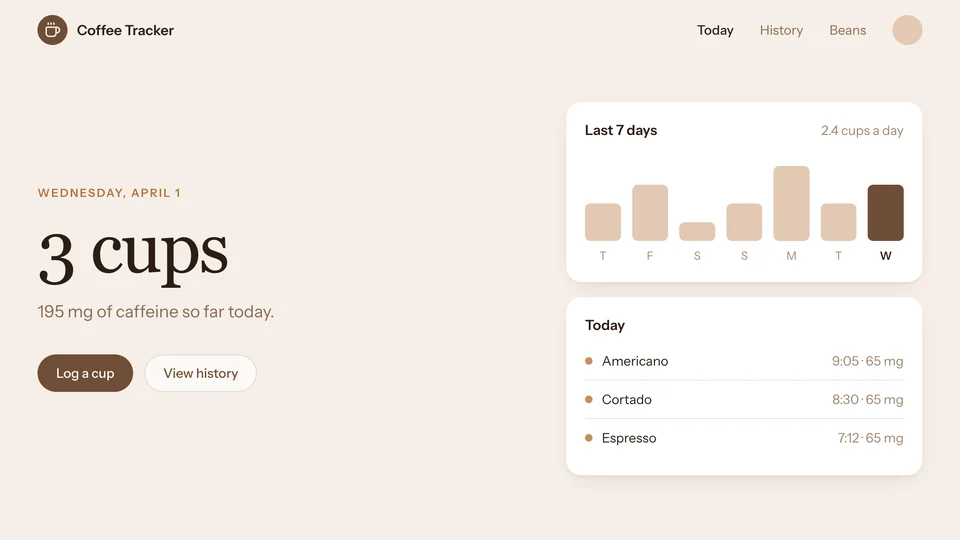
A demo of Herd Studio in the browser, open on coffee-tracker.test: in the live preview, someone picks the Log a cup button with the element picker and circles the week's chart with the pen. Both go with their prompt to the agent, which turns the chart into a line chart in the button's color, and the preview shows it as soon as the edit lands.
Thursday, October 29
3 cups
195 of 400 mg of caffeine today.
Last 7 days
2.4 cups a day
▋
button "Log a cup"
.grid > .flex > .mt-6 > .rounded-full
Ask anything... Use @ to mention a file.
Thursday, October 29
3 cups paragraph "3 cups"
195 mg of caffeine so far today.
Last 7 days
2.4 cups a day

Want feedback before your app is deployed anywhere? Share it with Expose, which is built right into Herd. Your local site gets a public URL in seconds, so a friend, a client or a colleague can try it on their own device while you keep building.
For someone who has never set up a development environment, this is the whole point: you work on your app, not on your tooling. And because everything you build is a regular Laravel application, you are never locked in. When you are ready to open the code in an editor, it follows the same conventions as every other Laravel app out there.
Bring your own agent
Herd does not ship its own agent. Instead, Herd Studio is the interface for the agent you choose: Claude Code, Codex, OpenCode, Cursor or any CLI agent you already trust. Your subscription stays yours, and we do not put a model of our own between you and your code.
What Herd adds is context. With Laravel Boost, your agent can look at your local environment the way you would: the queries your app runs, the emails it sends, its logs and its settings. With Herd Pro, it also gets runtime context from your running application, so it debugs with real data instead of guessing.
A demo of Claude Code with Laravel Boost in the folder of coffee-tracker.test. Asked why the History page got slow and why the link in the weekly email doesn't work, it runs herd dumps:list --type=query and finds a query for each cup's bean, reads the email with herd mail:latest and finds links to http://localhost, eager loads the beans, secures the site with herd secure and sets APP_URL to https://coffee-tracker.test with herd site:env set.
Claude Code v2.1.283
Opus 5.5 · Claude Max
~/Herd/coffee-tracker
❯
(herd )
Running…
Added , removed
✻︎
Herding…
❯ Try "fix lint errors"
? for shortcuts
And if you like to run several agents at once, parallel workspaces give each one its own copy of your app, with its own domain and, if you want, its own database. Workspaces are copy-on-write clones, so they are created in an instant and are far more flexible than git worktrees. Your agents work side by side without stepping on each other.
A demo of Herd's workspaces on macOS: in the terminal, herd workspace feature-auth --database=clone creates a copy of acme-dashboard on its own branch, served at feature-auth.acme-dashboard.test with PHP 8.4, HTTPS and a copy of its MySQL database. Herd's Applications window lists it right away as the site's first workspace.

Applications
Let's build something amazing
Describe your app idea and let an AI agent scaffold it from your selected stack, or leave the prompt empty to configure a new app yourself.
Recent Applications
See All
~/Herd/acme-dashboard/
Workspaces
feature-dark-mode
feature-dark-mode.my-next-project.test
Workspaces
feature-auth
feature-auth.acme-dashboard.test DB copy
Workspaces
feature-brew-timer
feature-brew-timer.coffee-tracker.test
feature-bean-inventory
feature-bean-inventory.coffee-tracker.test
Services
Environment
you@mac acme-dashboard %
you@mac acme-dashboard %
Ship it to Laravel Cloud
An app that only runs on your laptop is a prototype. With Herd 2.0, getting it online is part of the same flow.
Once you have reviewed your changes in Herd Studio, let your agent commit and push them, then deploy to Laravel Cloud from the same tab. Herd shows each stage as it runs, from prepare to build to release, and hands you the live URL when it is done. Every application in Herd also has a "Deploy to Laravel Cloud" button right next to its settings.
A demo of the Changes view of Herd Studio: someone picks Commit & push, and the agent commits the changes and pushes them. Then Deploy deploys the app to Laravel Cloud, through its prepare, build and release stages, until it's live.
Deploying your application
https://coffee-tracker-main-bx3nkq.laravel.cloudDeployed in 38s
No changes in this worktree.
That means someone with an idea and no infrastructure experience can go from a sentence in a prompt to a production app on managed hosting, without ever learning what a web server config looks like. And experienced developers get a deploy path that is one click away instead of a separate project.
Get Herd 2.0
Herd 2.0 is available now for macOS and Windows.
If you have been using Herd for years, update and keep working the way you always have, then give Herd Studio a try on your next feature. And if you have an idea you have never been able to build: this is the best time to start. Download Herd and tell us what you build.