> ## Documentation Index
> Fetch the complete documentation index at: https://herd.laravel.com/docs/llms.txt
> Use this file to discover all available pages before exploring further.
# Herd Studio
# Herd Studio
Herd Studio brings coding agents and your everyday development tools into the browser, right next to the site you're working on. You can ask an agent to build a feature, edit code, review changes, run a terminal, watch your dev server and deploy – without leaving your local `.test` site.
Herd Studio runs entirely on your PC. It works with the AI providers and coding agents that you already use, so you can [connect your own AI provider](/docs/windows/herd-studio/ai-providers) and start building. Don't have an AI subscription? Herd Studio comes with [free models via opencode](/docs/windows/herd-studio/ai-providers#free-models), so you can start without paying for AI at all.
## Enabling Herd Studio
You can turn Herd Studio on and off in the AI tab of the Herd settings with the "Enable Herd Developer Tools" toggle. You can also enable it from the What's New tour when you update to Herd 2.
When Herd Studio is enabled, Herd injects a small "Edit with Herd" badge into every page of your local `.test` sites. This works for all sites that Herd serves, not only Laravel applications. Clicking the badge opens Herd Studio for that site.
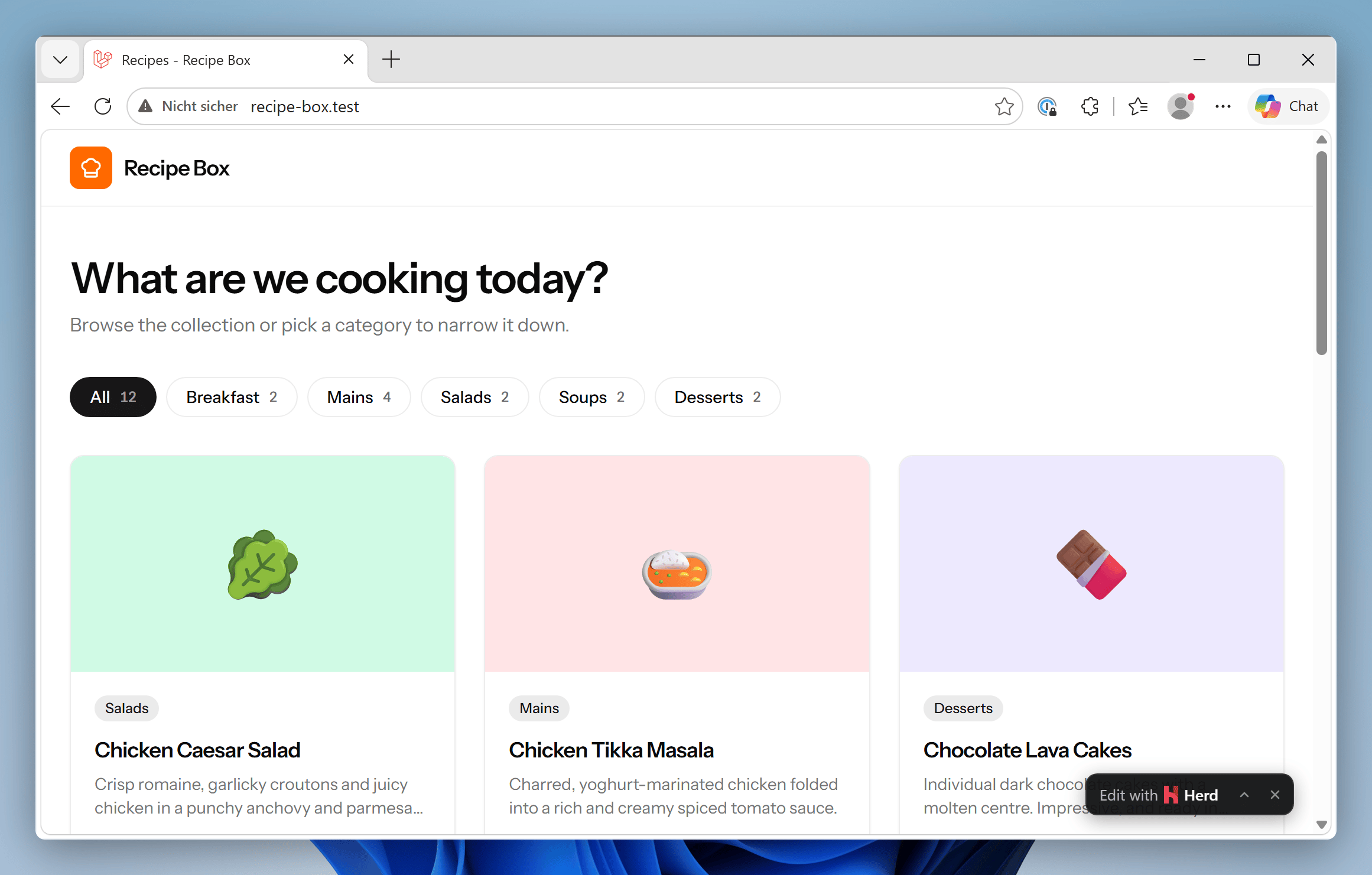 When you turn the toggle off, Herd removes the badge from all sites, the [Applications window](/docs/windows/sites/managing-sites) opens your sites directly instead of Herd Studio, and Herd no longer [starts dev servers automatically](/docs/windows/herd-studio/dev-server). The `/herd-studio` URL of a site and the `herd studio` command keep working, so you can still open Herd Studio when you need it.
## Opening Herd Studio
There are several ways to open Herd Studio for a site:
* Click the "Edit with Herd" badge on any page of the site.
* Visit `/herd-studio` on the site, for example `https://my-app.test/herd-studio`.
* Click "Open" on a site in the [Applications window](/docs/windows/sites/managing-sites) or double-click the site. With Herd Studio enabled, this opens the site in Herd Studio.
* Run `herd studio` in your project directory, or `herd studio my-app` from anywhere.
```powershell theme={null}
cd $HOME\Herd\my-app
herd studio
```
## What's inside Herd Studio
Herd Studio shows a live preview of your site next to a set of tools for the site:
When you turn the toggle off, Herd removes the badge from all sites, the [Applications window](/docs/windows/sites/managing-sites) opens your sites directly instead of Herd Studio, and Herd no longer [starts dev servers automatically](/docs/windows/herd-studio/dev-server). The `/herd-studio` URL of a site and the `herd studio` command keep working, so you can still open Herd Studio when you need it.
## Opening Herd Studio
There are several ways to open Herd Studio for a site:
* Click the "Edit with Herd" badge on any page of the site.
* Visit `/herd-studio` on the site, for example `https://my-app.test/herd-studio`.
* Click "Open" on a site in the [Applications window](/docs/windows/sites/managing-sites) or double-click the site. With Herd Studio enabled, this opens the site in Herd Studio.
* Run `herd studio` in your project directory, or `herd studio my-app` from anywhere.
```powershell theme={null}
cd $HOME\Herd\my-app
herd studio
```
## What's inside Herd Studio
Herd Studio shows a live preview of your site next to a set of tools for the site:
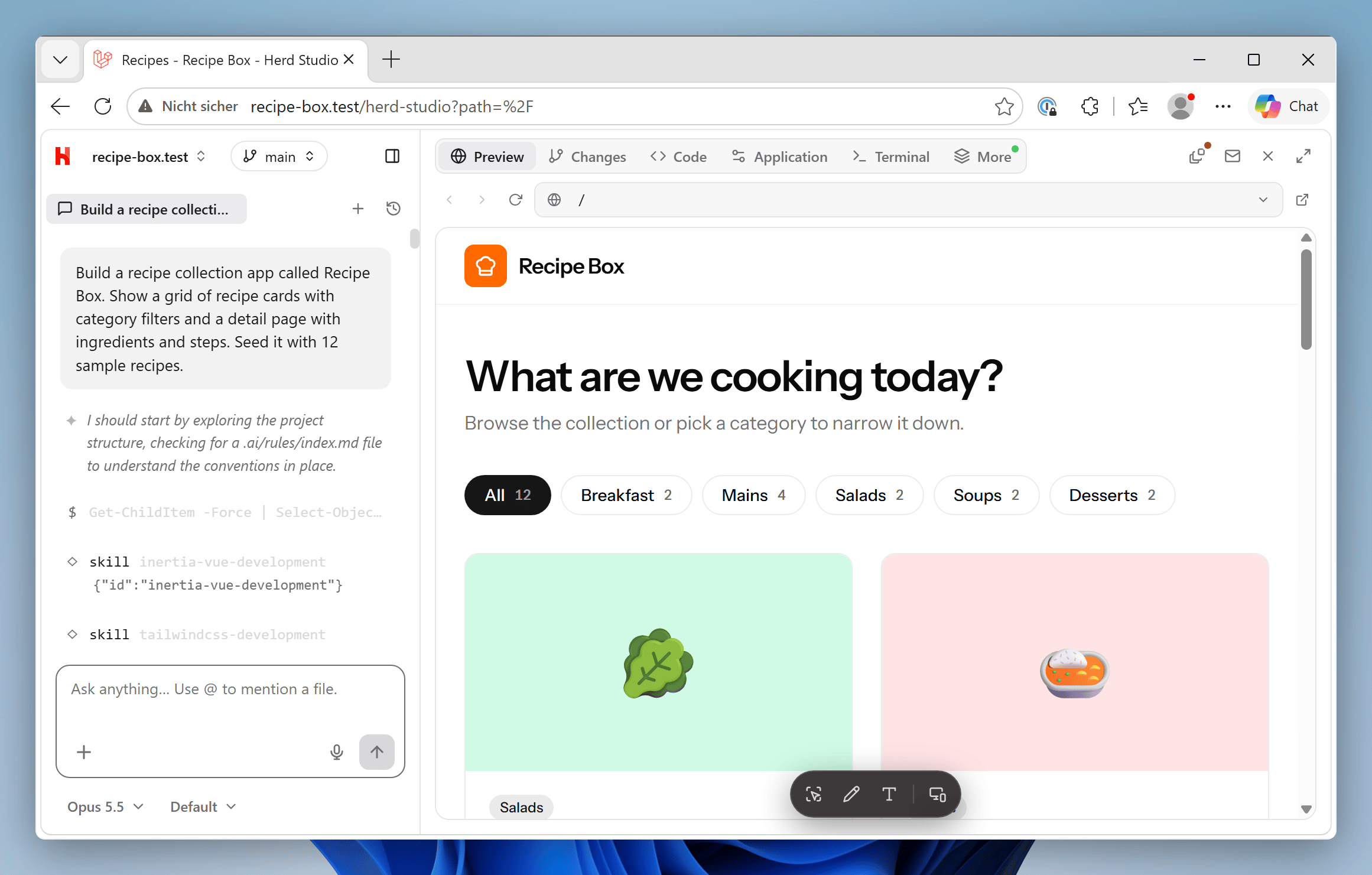 | Tool | What it does |
| - | - |
| Agent chat | Talk to a coding agent about this site. Each site can have several conversations, and agents can ask questions, propose plans for your approval and accept image attachments. |
| Code | Browse, search and edit the project files with PHP autocompletion. |
| Changes | Review what the agent changed as a diff. For projects without git, Herd offers to initialize a repository. |
| Terminal | Run commands in terminals that live inside the project directory. |
| Dev server | Watch `php artisan dev` or Vite with each process separately. See [Dev Server](/docs/windows/herd-studio/dev-server). |
| Logs | Tail the log files in `storage/logs` of your application. |
| Queue | Run and watch `php artisan queue:listen`. |
| Site | Change the PHP version, HTTPS, isolation and the [services](/docs/windows/herd-pro-services/per-site-services) the site uses. |
| Tinker | Run PHP snippets in the context of your application. Requires Herd Pro. |
| Insights | See the [dumps, queries, logs, jobs and HTTP requests](/docs/windows/debugging/insights) of this site. Agents can read them too. Requires Herd Pro. |
| Share | Share the site via [Expose](/docs/windows/sites/sharing-sites). |
| Cloud | Deploy the site to [Laravel Cloud](/docs/windows/integrations/laravel-cloud). |
When your Laravel application throws an exception, Herd Studio shows the latest exception of the site and lets you hand it to an agent.
From Herd Studio, you can also start [workspaces](/docs/windows/sites/workspaces) – isolated copies of your site on their own branch and domain – so that several agents can work in parallel without getting in each other's way.
## Settings
The AI tab of the settings contains all options for Herd Studio:
| Tool | What it does |
| - | - |
| Agent chat | Talk to a coding agent about this site. Each site can have several conversations, and agents can ask questions, propose plans for your approval and accept image attachments. |
| Code | Browse, search and edit the project files with PHP autocompletion. |
| Changes | Review what the agent changed as a diff. For projects without git, Herd offers to initialize a repository. |
| Terminal | Run commands in terminals that live inside the project directory. |
| Dev server | Watch `php artisan dev` or Vite with each process separately. See [Dev Server](/docs/windows/herd-studio/dev-server). |
| Logs | Tail the log files in `storage/logs` of your application. |
| Queue | Run and watch `php artisan queue:listen`. |
| Site | Change the PHP version, HTTPS, isolation and the [services](/docs/windows/herd-pro-services/per-site-services) the site uses. |
| Tinker | Run PHP snippets in the context of your application. Requires Herd Pro. |
| Insights | See the [dumps, queries, logs, jobs and HTTP requests](/docs/windows/debugging/insights) of this site. Agents can read them too. Requires Herd Pro. |
| Share | Share the site via [Expose](/docs/windows/sites/sharing-sites). |
| Cloud | Deploy the site to [Laravel Cloud](/docs/windows/integrations/laravel-cloud). |
When your Laravel application throws an exception, Herd Studio shows the latest exception of the site and lets you hand it to an agent.
From Herd Studio, you can also start [workspaces](/docs/windows/sites/workspaces) – isolated copies of your site on their own branch and domain – so that several agents can work in parallel without getting in each other's way.
## Settings
The AI tab of the settings contains all options for Herd Studio:
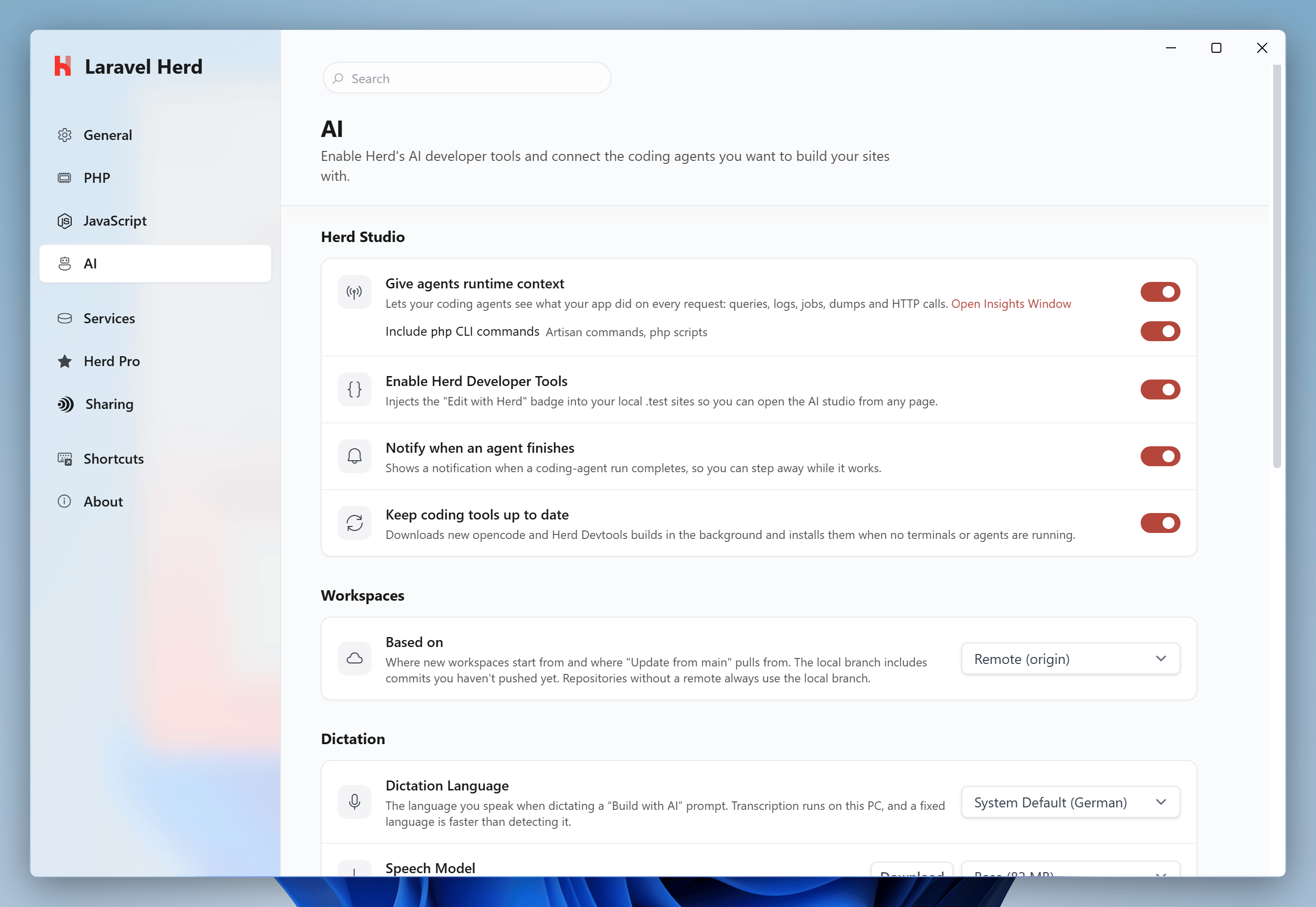 * **Enable Herd Developer Tools**: shows or hides the "Edit with Herd" badge on all sites.
* **Notify when an agent finishes**: shows a Windows notification when an agent run completes.
* **Keep coding tools up to date**: downloads updates for the bundled coding tools in the background.
* **Workspaces**: choose whether new [workspaces](/docs/windows/sites/workspaces) start from the remote (`origin`) or from your local branch.
* **Dictation**: select the language and the speech model for [dictating prompts](/docs/windows/herd-studio/build-with-ai#dictation).
* **AI Providers**: connect the AI providers that you want to use. See [AI Providers](/docs/windows/herd-studio/ai-providers).
## Updates
Herd Studio and its coding tools update independently from Herd itself. Herd checks for updates shortly after launch, once a day, and when your PC wakes up.
To avoid interrupting your work, Herd installs updates for the coding tools only when no terminals or agents are running. If an update waits for more than three days, Herd shows a notification. Updates to the Herd Studio interface apply right away, and open Herd Studio tabs offer a reload.
You can turn off automatic updates with the "Keep coding tools up to date" setting.
## Files and ports
Herd stores the Herd Studio tools and data in its configuration directory:
```powershell theme={null}
# Bundled coding tools like opencode and the Herd Devtools helper
%USERPROFILE%\.config\herd\bin\tools
# The Herd Studio interface
%USERPROFILE%\.config\herd\herd-ai-widget
# Agent sessions and other Herd Studio data
%USERPROFILE%\.config\herd\devtools
```
The Herd Devtools helper listens on `127.0.0.1:4421` and only accepts local connections. If another application uses this port, Herd Studio can't connect to its agents. The bundled opencode server runs on a random local port that Herd picks on every start.
* **Enable Herd Developer Tools**: shows or hides the "Edit with Herd" badge on all sites.
* **Notify when an agent finishes**: shows a Windows notification when an agent run completes.
* **Keep coding tools up to date**: downloads updates for the bundled coding tools in the background.
* **Workspaces**: choose whether new [workspaces](/docs/windows/sites/workspaces) start from the remote (`origin`) or from your local branch.
* **Dictation**: select the language and the speech model for [dictating prompts](/docs/windows/herd-studio/build-with-ai#dictation).
* **AI Providers**: connect the AI providers that you want to use. See [AI Providers](/docs/windows/herd-studio/ai-providers).
## Updates
Herd Studio and its coding tools update independently from Herd itself. Herd checks for updates shortly after launch, once a day, and when your PC wakes up.
To avoid interrupting your work, Herd installs updates for the coding tools only when no terminals or agents are running. If an update waits for more than three days, Herd shows a notification. Updates to the Herd Studio interface apply right away, and open Herd Studio tabs offer a reload.
You can turn off automatic updates with the "Keep coding tools up to date" setting.
## Files and ports
Herd stores the Herd Studio tools and data in its configuration directory:
```powershell theme={null}
# Bundled coding tools like opencode and the Herd Devtools helper
%USERPROFILE%\.config\herd\bin\tools
# The Herd Studio interface
%USERPROFILE%\.config\herd\herd-ai-widget
# Agent sessions and other Herd Studio data
%USERPROFILE%\.config\herd\devtools
```
The Herd Devtools helper listens on `127.0.0.1:4421` and only accepts local connections. If another application uses this port, Herd Studio can't connect to its agents. The bundled opencode server runs on a random local port that Herd picks on every start.