> ## Documentation Index
> Fetch the complete documentation index at: https://herd.laravel.com/docs/llms.txt
> Use this file to discover all available pages before exploring further.
# Per-Site Services
# Per-Site Services
Herd Pro lets you choose which services a Laravel application uses right from the Applications window. Instead of looking up hosts, ports and credentials and editing your `.env` file by hand, you select a service from a dropdown and Herd updates the configuration for you.
## Switching services
Select a site in the [Applications window](/docs/macos/sites/managing-sites). The "Services" section of the inspector shows one dropdown for each of these categories:
| Category | Built-in options | Herd services |
| - | - | - |
| Database | SQLite | MySQL, MariaDB, PostgreSQL, MongoDB |
| Queue | Sync, Database | Redis, Valkey |
| Cache | Array, Database, File | Redis, Valkey |
| Broadcasting | Log, None | Laravel Reverb |
Each dropdown lists the built-in Laravel options, the matching [services](/docs/macos/herd-pro-services/services) that you already installed and services that you can install. When you select a service that isn't installed yet, Herd installs and starts it, and applies it to your application afterwards.
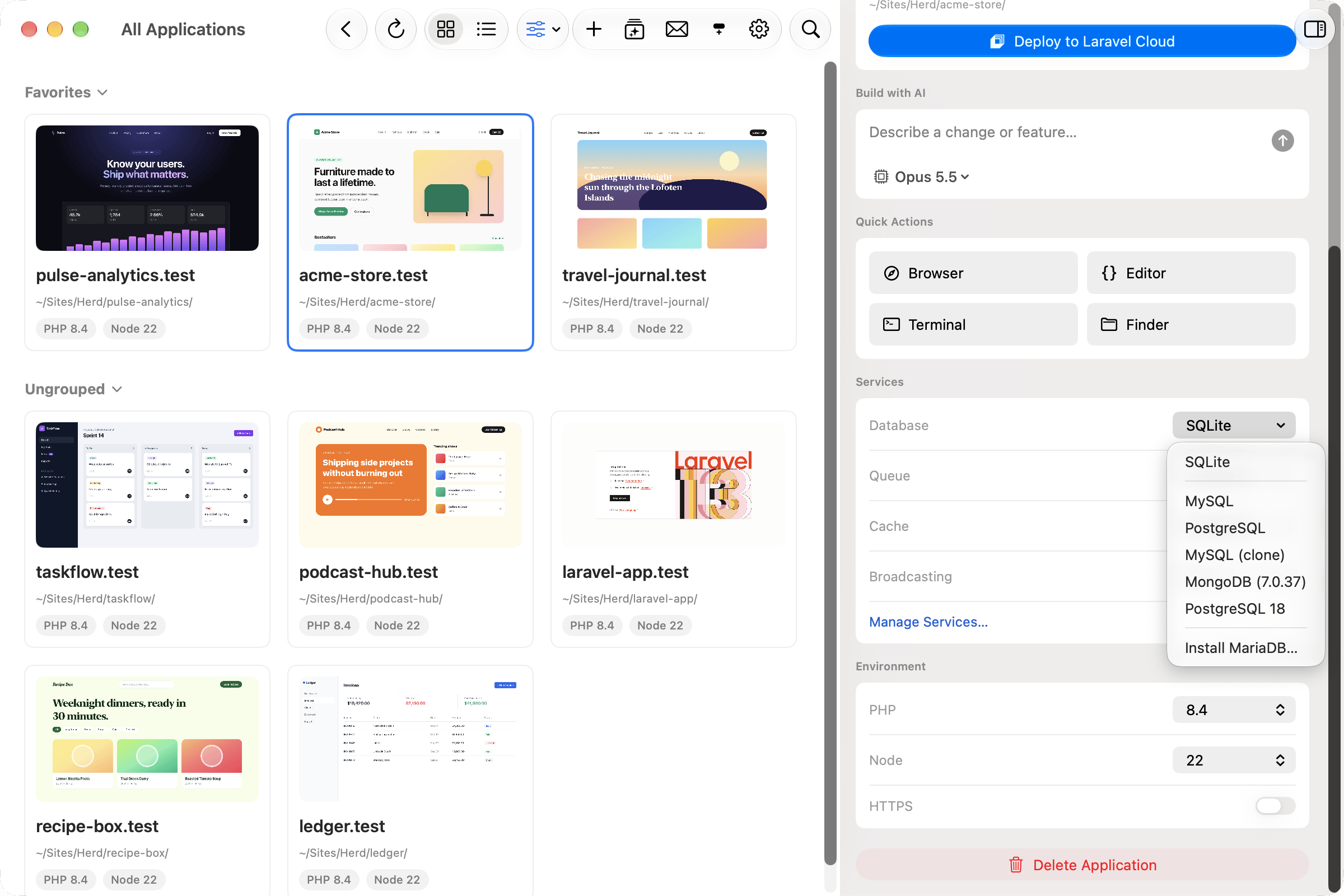 When you switch to MySQL, MariaDB or PostgreSQL, Herd asks which database the application should use. You can pick an existing database or create a new one. To use a different database on the same server later, click "Change…" below the database name.
Per-site services are available for Laravel applications. For other applications, use the [services settings](/docs/macos/herd-pro-services/services) and configure the connection yourself.
## What Herd changes in your `.env` file
Herd detects the current configuration from your `.env` file and only changes the keys of the category that you switch:
| Category | Keys |
| - | - |
| Database | `DB_CONNECTION`, `DB_HOST`, `DB_PORT`, `DB_USERNAME`, `DB_PASSWORD`, `DB_URI` |
| Queue | `QUEUE_CONNECTION` and `REDIS_*` |
| Cache | `CACHE_STORE`, `CACHE_DRIVER` and `REDIS_*` |
| Broadcasting | `BROADCAST_CONNECTION`, `BROADCAST_DRIVER` and `REVERB_*` |
Herd keeps your `DB_DATABASE` value when you switch database servers, unless you select or create a different database. When you switch to SQLite, Herd sets `DB_DATABASE` to `database/database.sqlite` and creates the file if it doesn't exist.
Before Herd changes a category for the first time, it saves the original values to a `.env.herd-services.bak` file next to your `.env` file. Select "Not managed by Herd" in the dropdown to restore these values.
## Via the CLI
You can view and change the services of a site with the `herd site:services` command. Without arguments, it lists all categories with their current value and all options.
```bash theme={null}
# Show all categories and options
herd site:services
# Use the installed Redis service for the queue
herd site:services queue redis
# Use SQLite as database
herd site:services database sqlite
# Restore the values that Herd replaced
herd site:services cache unmanaged
```
You can pass a built-in option like `sqlite`, `sync`, `database`, `array`, `file`, `log` or `null`, or the name, type or ID of an installed service.
When you switch to MySQL, MariaDB or PostgreSQL, Herd asks which database the application should use. You can pick an existing database or create a new one. To use a different database on the same server later, click "Change…" below the database name.
Per-site services are available for Laravel applications. For other applications, use the [services settings](/docs/macos/herd-pro-services/services) and configure the connection yourself.
## What Herd changes in your `.env` file
Herd detects the current configuration from your `.env` file and only changes the keys of the category that you switch:
| Category | Keys |
| - | - |
| Database | `DB_CONNECTION`, `DB_HOST`, `DB_PORT`, `DB_USERNAME`, `DB_PASSWORD`, `DB_URI` |
| Queue | `QUEUE_CONNECTION` and `REDIS_*` |
| Cache | `CACHE_STORE`, `CACHE_DRIVER` and `REDIS_*` |
| Broadcasting | `BROADCAST_CONNECTION`, `BROADCAST_DRIVER` and `REVERB_*` |
Herd keeps your `DB_DATABASE` value when you switch database servers, unless you select or create a different database. When you switch to SQLite, Herd sets `DB_DATABASE` to `database/database.sqlite` and creates the file if it doesn't exist.
Before Herd changes a category for the first time, it saves the original values to a `.env.herd-services.bak` file next to your `.env` file. Select "Not managed by Herd" in the dropdown to restore these values.
## Via the CLI
You can view and change the services of a site with the `herd site:services` command. Without arguments, it lists all categories with their current value and all options.
```bash theme={null}
# Show all categories and options
herd site:services
# Use the installed Redis service for the queue
herd site:services queue redis
# Use SQLite as database
herd site:services database sqlite
# Restore the values that Herd replaced
herd site:services cache unmanaged
```
You can pass a built-in option like `sqlite`, `sync`, `database`, `array`, `file`, `log` or `null`, or the name, type or ID of an installed service.